AWS Organizations
Concepts
- Prevent any non - compliant tagging operations on specified services and resources
- Generate a report that lists all tagged/non - compliant resources
- IAM Policy evaluation logic:
- Evaluate explicit deny
- Organizations SCPs
- Resource - based Policies
- IAM Permissions Boundaries
- Session Policies
- Identity - based Policies
- Control Tower
- Uses Service Catalog to provision new aws accounts
- Guardrails: Preventive using SCP. Detective using AWS Config.
- Example: Detect untagged resources and report them.
- Resources Access Manager (RAM)
- Allow sharing of resources
- Cannot share security groups and default VPC. Security groups from other accounts can be referenced for maximum security.
- AWS Network firewall policies can be shared.
- EC2 (Dedicated Hosts, Capacity Reservation)
- Aurora DB Clusters can be shared.
- All accounts must belong to the same organization
- OrganizationAccountAccessRole: used in the management account to operate on member account
- Use tagging standards for billing purpose
- Enable CloudTrail on all accounts, send logs to central S3 account
- Send CloudWatch Logs to central logging account
- Consolidated billing features (or) all features (default). If Consolidated billing feature is set, you cannot use the SCP to your member AWS accounts anymore.
- Consolidated billing features:
- Consolidated Billing across all accounts - single payment method
- Pricing benefits from aggregated usage (volume discount for EC2, S3…)
- Reserved Instances (RI) benefits
The migration from consolidated billing features to all features is one-way. You can't switch an organization with all features enabled back to consolidated billing features only.
For moving an OU under another OU, create a new OU under the parent, move accounts and delete the current OU.
For removing an account, you must sign in as an IAM user or role in the management account with the following permissions: organizations:DescribeOrganization – required only when using the Organizations console organizations:RemoveAccountFromOrganization
From a member account, organizations:LeaveOrganization is required. Note that the organization administrator can apply a policy to your account that removes this permission, preventing you from removing your account from the organization.
Troubleshooting
- You can remove a member account only after you enable IAM user access to billing in the member account. For more information, see Activating Access to the Billing and Cost Management Console in the AWS Billing User Guide.
- You can remove an account from your organization only if the account has the information required for it to operate as a standalone account.
Service Control Policies (SCP)
- Service-linked roles enable other AWS services to integrate with AWS Organizations and can't be restricted by SCPs
- SCP must have an explicit Allow (does not allow anything by default)
- Explicit Deny at a higher level OU impacts all children OU & corresponding accounts.
- Use CloudWatch Events to monitor non compliant tags
Service control policies (SCPs) are a type of organization policy that you can use to manage permissions in your organization. SCPs offer central control over the maximum available permissions for all accounts in your organization. However, SCPs alone are not sufficient for allowing access to the accounts in your organization. Attaching an SCP to an AWS Organizations entity just defines a guardrail for what actions the principals can perform. You still need to attach identity-based or resource-based policies to principals or resources in your organization's accounts to actually grant permission to them.
SCPs affect only member accounts in the organization. They have no effect on users or roles in the management account (also known as the master account).
Policy Inheritance
- When you attach a policy to the organization root, all OUs and accounts in the organization inherit that policy.
- When you attach a policy to a specific OU, accounts that are directly under that OU or any child OU inherit the policy.
- You CANNOT modify an SCP that is applied to multiple OUs at one child OU.
- When you attach a policy to a specific account, it affects only that account.
SCP Strategies
Deny List Strategy
- In this strategy, everything is allowed at the root. At the specific OU or account level, apply Deny as per requirements.
- Explicit Deny overrides an Explicit Allow
Allow List Strategy
- In this strategy, Allow All Policy is removed at the root. This means that at the root and below, there is Implicit Deny.
- At the specific OU or account level, apply Allow as per requirements.
- Explicit Allow overrides an Implicit Deny
An explicit Deny overrides an explicit Allow, which overrides the default implicit Deny
Any account has only those permissions permitted by every parent above it. If a permission is blocked at any level above the account, either implicitly (by not being included in an Allow policy statement) or explicitly (by being included in a Deny policy statement), a user or role in the affected account can't use that permission, even if the account administrator attaches the AdministratorAccess IAM policy with / permissions to the user. See the diagram below
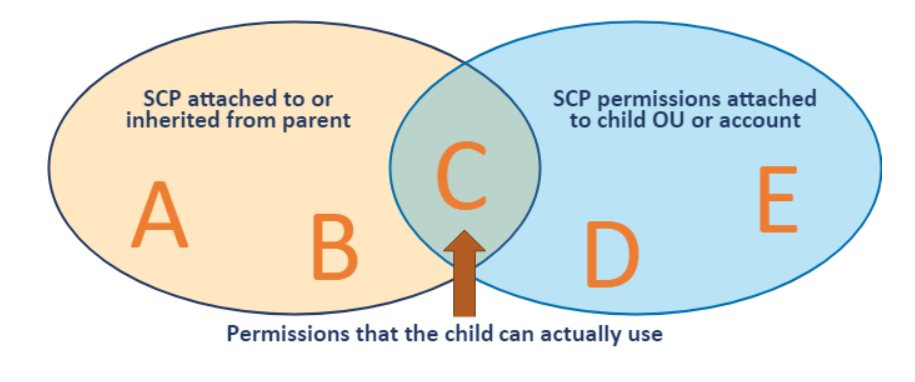
This means that to allow an AWS service API at the member account level, you must allow that API at every level between the member account and the root of your organization.
Consolidated Billing
- For billing purposes, the consolidated billing feature of AWS Organizations treats all the accounts in the organization as one account.
- This means that all accounts in the organization can receive the hourly cost-benefit of Reserved Instances that are purchased by any other account.
- In the payer account, you can turn off Reserved Instance discount sharing on the Preferences page on the Billing and Cost Management console.
By default, member account DOES NOT have the capability to turn-off RI sharing on their account.
AWS Config and Organizations
- Multi-account, multi-region data aggregation in AWS Config enables you to aggregate AWS Config data from multiple accounts and AWS Regions into a single account.
Enable trusted access to AWS Config through service-linked role
aws organizations enable-aws-service-access \
    --service-principal config.amazonaws.com