ELB, API Gateway and AppSync
ELB
ALB:
- ALB vs CLB: ALB supports SNI (Server Name Indication) that allows multiple SSL certificates to be stored.
- ALB: Load balancing to multiple HTTP applications across machines (target groups) - one more level of indirection before the actual targets are identified.
- ALB: Load balancing to multiple applications within a container (through dynamic port mapping)
- ALB: Routing rules for path, header, query string
- ALB: Health checks are at target group level. Targets can be EC2 instances (auto-scaling group), ECS Service, Lambda functions or private IPs.
Application Load Balancer (V2)
With Application Load Balancers, the load balancer node that receives the request uses the following process:
- Evaluates the listener rules in priority order to determine which rule to apply.
- Selects a target from the target group for the rule action, using the routing algorithm configured for the target group.
- The default routing algorithm is round robin.
- Consider Least Outstanding Requests if the targets vary in processing capability (or) requests for your application vary in complexity.
- Routing is performed independently for each target group, even when a target is registered with multiple target groups.
- x-forwarded-for can be used with ALB to capture client IP.
- With ALB, SSL can be terminated at ALB itself. Optionally, a self-signed certificate can be used by target instances for a full encrypted connectivity.
Multiple Web domains
- SNI allows multiple domains to serve SSL traffic without the need to re-authenticate and re-provision a new certificate whenever a new domain name is added.
- SNI Custom SSL relies on the SNI extension of the Transport Layer Security protocol, which allows multiple domains to serve SSL traffic over the same IP address by including the hostname which the viewers are trying to connect to.
It’s always been possible to use wildcard and subject-alternate-name (SAN) certificates with ALB, but these come with limitations. Wildcard certificates only work for related subdomains that match a simple pattern. While SAN certificates can support many different domains, the same certificate authority has to authenticate each one. That means you have reauthenticate and reprovision your certificate everytime you add a new domain. If the requirement specifies "without the need to re-authenticate and re-provision" - choose SNI.
You can configure Amazon CloudFront to require viewers to interact with your content over an HTTPS connection using the HTTP to HTTPS Redirect feature. If you configure CloudFront to serve HTTPS requests using SNI, CloudFront associates your alternate domain name with an IP address for each edge location. The IP address to your domain name is determined during the SSL/TLS handshake negotiation and isn’t dedicated to your distribution.
Classic Load Balancer
With Classic Load Balancers, the load balancer node that receives the request selects a registered instance as follows:
- Uses the round robin routing algorithm for TCP listeners
- Uses the least outstanding requests routing algorithm for HTTP and HTTPS listeners
NLB:
- NLB: Layer 4 - forward TCP & UDP traffic to your instances. Handles millions of requests per second. around 100ms latency vs. 400 ms for ALB
- NLB: can redirect to only IP Addresses
- NLB: Target groups: private IPs, EC2 instances or ALB
- If target instance is specified by Instance ID, client's IP address is seen by the target instance.
- If target instance is specified by IP Address, NLB's IP address is seen by the target instance.
- When using an NLB with VPC Endpoint or Global Accelerator, source IPs are private IPs of NLB nodes. (i.e. as if the target's IP Address is registered)
- With NLB, entire traffic is encrypted and target instances must use public certificate.
- When using an NLB with VPC Endpoint, NACL associated with the NLB subnets must allow communication to and from the targets.
-
NLB uses Flow Hash algorithm for routing.
-
NLB: NLB does not have a security group. Basically, you will have the ability to either use the security group function already associated with your EC2 Instance’s network card (ENI), a VPC Network Access Control List (NACL), AWS Network Firewall, or some other type of marketplace solution to provide the necessary security controls that you are seeking.
With Network Load Balancers, the load balancer node that receives the connection uses the following process:
- Selects a target from the target group for the default rule using a flow hash algorithm. It bases the algorithm on:
- The protocol
- The source IP address and source port
- The destination IP address and destination port
- The TCP sequence number
- Routes each individual TCP connection to a single target for the life of the connection. The TCP connections from a client have different source ports and sequence numbers, and can be routed to different targets.
GLB:
- GLB: New way to run virtual network appliances in the cloud
- GLB: Gateway Load Balancer helps you easily deploy, scale, and manage your third-party virtual appliances.
- GLB: It gives you one gateway for distributing traffic across multiple virtual appliances while scaling them up or down, based on demand.
- GLB: Centralize your third-party virtual appliances, Add third-party security appliances to your network, visibility of third-party analytics solutions
- GLB: Operates at Layer 3 (Network Layer) – IP Packet
- GLB: Target groups: EC2 instances and Private IP Addresses
Cross-Zone Load Balancing:
- NLB: Cross-zone load balancing is disabled by default and need to pay $ for cross-AZ traffic
- GLB: Cross-zone load balancing is disabled by default and need to pay $ for cross-AZ traffic
- NLB: Flow Hash request routing. Each TCP/UDP connection is routed to a single target for the life of the connection
- ALB can be a target group for NLB. You can now easily combine the benefits of NLB, including PrivateLink and zonal static IP addresses, with the advanced routing offered by ALB to load balance traffic to your applications.
Gateway Load Balancer provides both Layer 3 gateway and Layer 4 load balancing capabilities. It is a transparent bump-in-the-wire device that does not change any part of the packet. It is architected to handle millions of requests/second, volatile traffic patterns, and introduces extremely low latency.
All load balancers support Connection draining (deregistration delay). For the duration of the configured connection draining timeout, the load balancer will allow existing, in-flight requests made to an instance to complete, but it will not send any new requests to the instance. During this time, the API will report the status of the instance as InService, along with a message stating that “Instance deregistration currently in progress.” Once the timeout is reached, any remaining connections will be forcibly closed.
API Gateway
Edge-Optimized vs. Region
An edge-optimized API endpoint is best for geographically distributed clients. API requests are routed to the nearest CloudFront Point of Presence (POP). For mobile clients this is a good use case for this type of endpoint.
The Regional endpoint is best suited to traffic coming from within the Region only.
- Edge Optimized: Reduced Latency for requests around the world.
- Regional: Reduced latency for requests that originate in the same region. Can also configure your own CDN and protect with WAF.
- Private: Accessible within a VPC (or) Direct Connect
Security & Logging:
- CORS (Cross-origin resource sharing): Browser based security. Control which domains can call your API.
- Authn: Cognito User Pools, Lambda authorizer, AWS_IAM based access (expects AccessKey and SecretKey, which can be obtained through STS API)
- Can send logs directly into Kinesis Data Firehose (as an alternative to CW logs)
- X-Ray: Enable tracing to get extra information about requests in API Gateway. X-Ray API Gateway + AWS Lambda gives you the full picture.
Caching:
- You can enable API caching in Amazon API Gateway to cache your endpoint's responses.
- With caching, you can reduce the number of calls made to your endpoint and also improve the latency of requests to your API.
API Gateway Errors
5xx means Server errors
- 502: Bad Gateway Exception, usually for an incompatible output returned from a Lambda proxy integration backend and occasionally for out-of-order invocations due to heavy loads.
- 503: Service Unavailable Exception
- 504: Integration Failure – ex Endpoint Request Timed-out Exception. API Gateway requests time out after 29 second maximum
4xx means Client errors
- 400: Bad Request
- 403: Access Denied, WAF filtered
- 429: Quota exceeded, Throttle
Integrations
- Lambda: Lambda Proxy (or) Lambda custom
- HTTP: HTTP Proxy (or) HTTP Custom
- AWS service: Only non-proxy
Throttling
- Beyond 10,000 requests per second (or) 5,000 concurrent requests, you receive 429 Too Many Requests error response.
Usage Plans
- Premium users vs. Basic Users.
- API Key can be distributed per each usage plan.
AWS AppSync
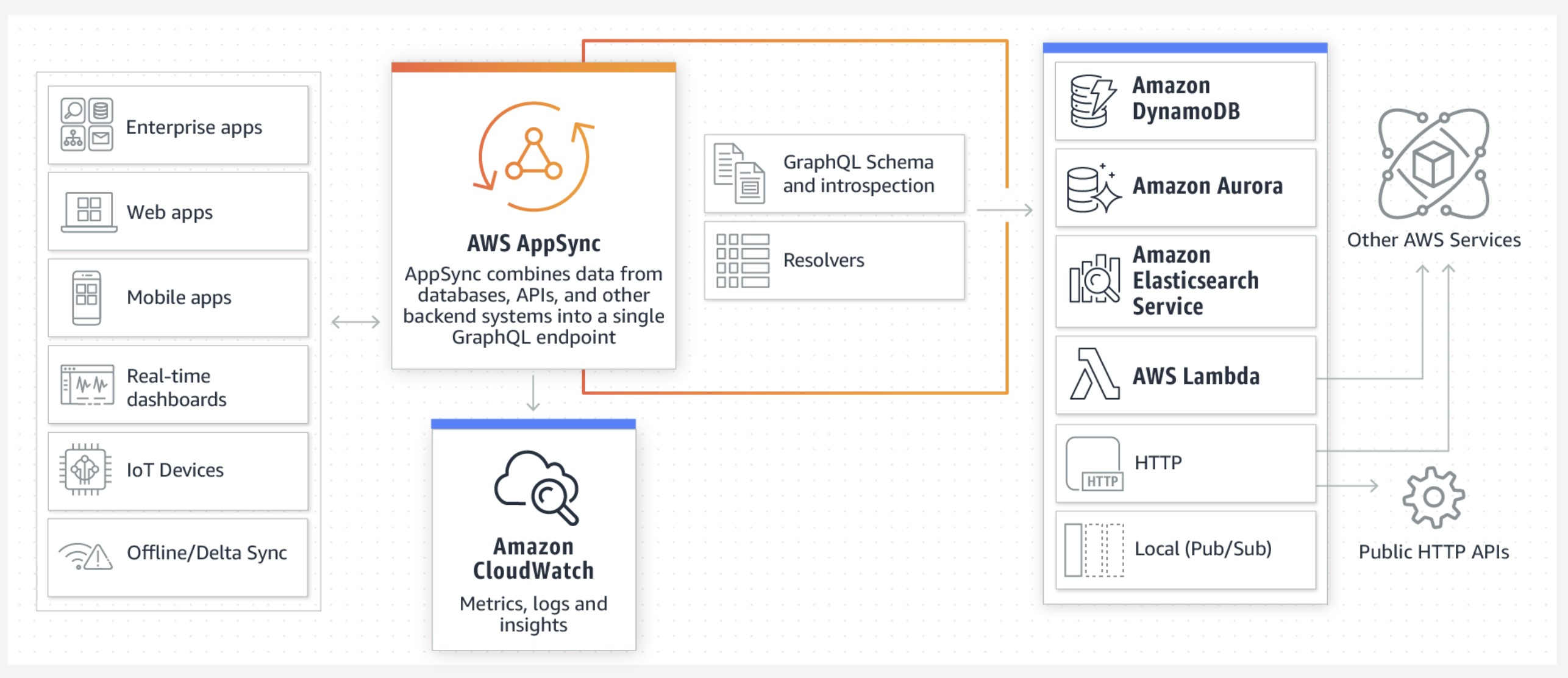
- AppSync is a managed service that uses GraphQL
- Retrieve data in real-time with WebSocket or MQTT on WebSocket
- AppSync is the gateway that sits in between data consumers and data providers (can be databases, Lambda, ElasticSearch or HTTP APIs)
AWS AppSync vs. API Gateway
For retrieving data from various/multiple sources, AppSync is the right choice.
WebSocket APIs
- WebSocket APIs are often used in real-time applications such as chat applications, collaboration platforms, multiplayer games, and financial trading platforms.
- You can use the @connections API from your backend service to send a callback message to a connected client, get connection information or disconnect from the client.