Identity
Summary of IAM Entities
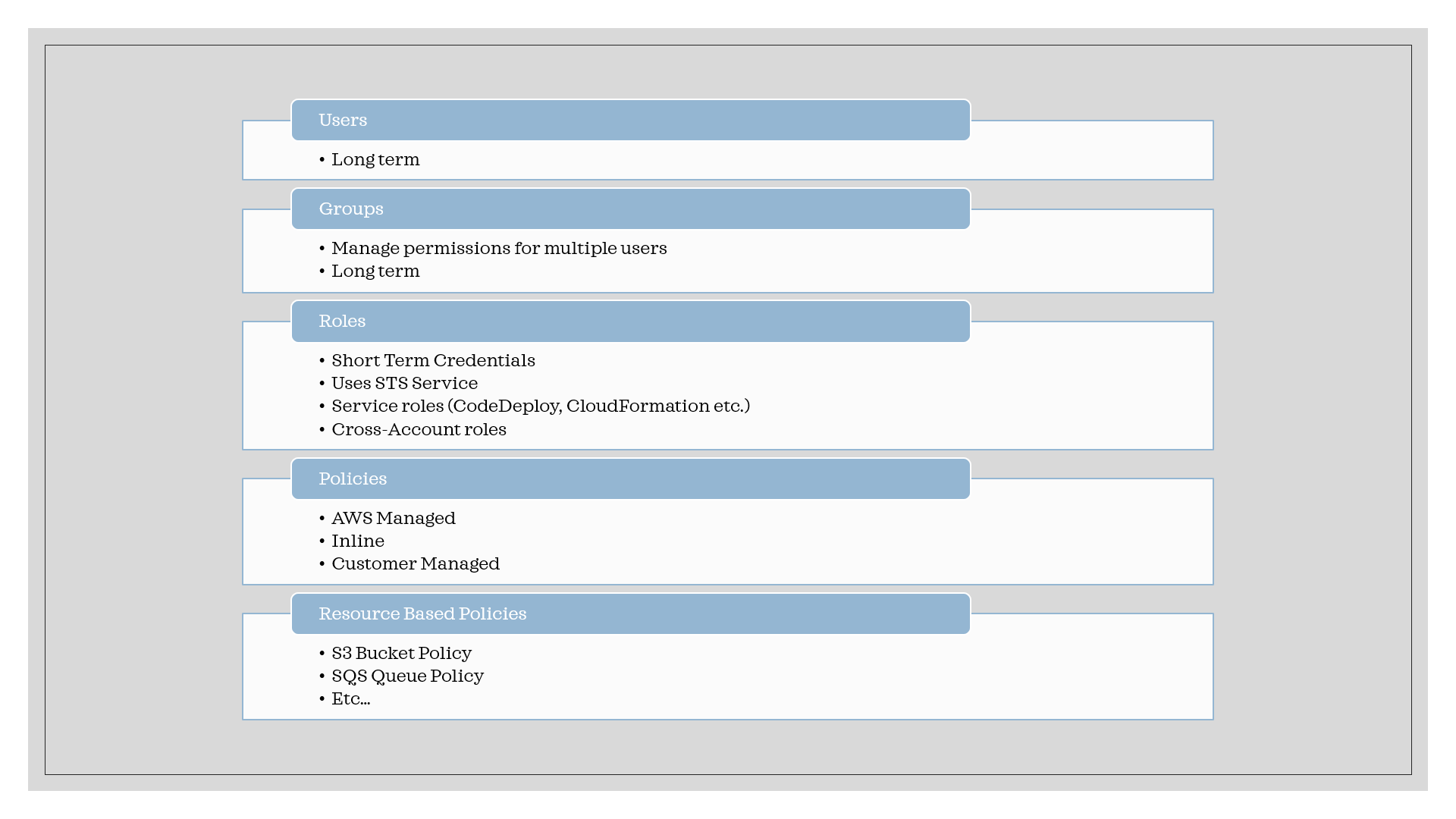
Roles & STS
- Roles use AWS STS to retrieve credentials and impersonate the IAM role the principal has access to.
- Temporary credentials can be valid between 15 minutes to 12 hours.
- Assume Role to an IAM User:
- Explicitly grant your users permission to assume the role.
- Users must switch to the this role using Console (or) AWS CLI (or) AWS API
- Additional protection: Mandate MFA for assuming the role, for extra security.
- MFA can be added as an additional layer of security for either assuming the role (or) for accessing aws services.
- Federated users cannot be assigned an MFA device. So resources protected by MFA Mandatory condition cannot be accessed by federated session contexts.
Important: When you assume a role, you give up your current permissions and temporarily take on a new role (with corresponding permissions).
IAM Groups vs Roles
For easily assigning duties or responsibilities to teams at scale, use IAM Groups
- IAM Groups: If a person changes jobs in your organization, instead of editing that user's permissions, you can remove him or her from the old user groups and add him or her to the appropriate new user groups. This is a simple way of assigning appropriate permissions to teams at scale.
- A user group cannot be identified as a Principal in a resource-based policy. A user group is a way to attach policies to multiple users at one time.
For allowing users temporary access, you can allow them to assume a role.
- An IAM role is very similar to a user, in that it is an identity with permission policies that determine what the identity can and cannot do in AWS.
- However, a role does not have any credentials (password or access keys) associated with it.
- Instead of being uniquely associated with one person, a role is intended to be assumable by anyone who needs it. An IAM user can assume a role to temporarily take on different permissions for a specific task.
Cross-account access
- Resource owner account: Create a role in the resource owner account (i.e the account where the resource resides), and provide permission to requester account root, the required access.
- Trust Policy: Establishes trust relationship to another account. Trust policy establishes who.
- Permissions: Describes what is allowed when this role is assumed. Permissions establishes what.
- Requester account: Provide permissions to the users or group or role to assume this cross-account role that is created in the resource owner account.
- Providing access to aws accounts owned by third-parties:
- The 3rd party aws account id is required.
- Add External ID - secret between you and the 3rd party. It helps to handle confused deputy problem.
- Define permissions in the IAM Policy
AssumeRole vs GetSessionToken
- GetSessionToken:
- User or root account
- Access resources in the same account as that of the user.
- The purpose of the GetSessionToken operation is to authenticate the user using MFA.
- Note that temporary credentials from a GetSessionToken request can access IAM and AWS STS API operations only if you include MFA information in the request for credentials.
- AssumeRole
- Role
- Call API operations that access resources in the same or a different AWS account.
- The temporary credentials returned by AssumeRole do not include MFA information in the context
IAM Permission Boundary
- IAM Permission Boundaries are supported for users and roles (not groups)
- Advanced feature to use a managed policy to set the maximum permissions an IAM entity can get.
- When you set a permissions boundary for an entity, the entity can perform only the actions that are allowed by both its identity-based policies and its permissions boundaries.
- Example: Permission boundary allows only s3: and ec2:, if policy allows iam:*, then nothing is allowed!
NOTE: Permission boundary limits the permissions (i.e. acts as an upper boundary) but does not provide permission on it's own.
Session Policies
- Session policies are advanced policies that you pass as a parameter when you programmatically create a temporary session for a role or federated user.
- The permissions for a session come from the IAM entity (user or role) used to create the session and from the session policy.
- The entity's identity-based policy permissions are limited by the session policy and the permissions boundary.
- The effective permissions for this set of policy types are the intersection of all three policy types.
Deep Dive:
Roles vs. Resource-based Policy
- When you assume a role (user, application or service), you give up your original permissions and take the permissions assigned to the role.
- When using a resource-based policy, the principal doesn’t have to give up any permissions.
Resource vs. Identity Policies
- Resource policies are inline only, not managed.
- If there is a deny in either of identity or resource policies, the action is denied, otherwise allowed, provided the resource is within an aws account
- For cross-account, the action must be allowed in both the accounts.
- For KMS and IAM role trust policies, resources must have a resource-based policy even when the principal and the KMS key or IAM role are in the same account.
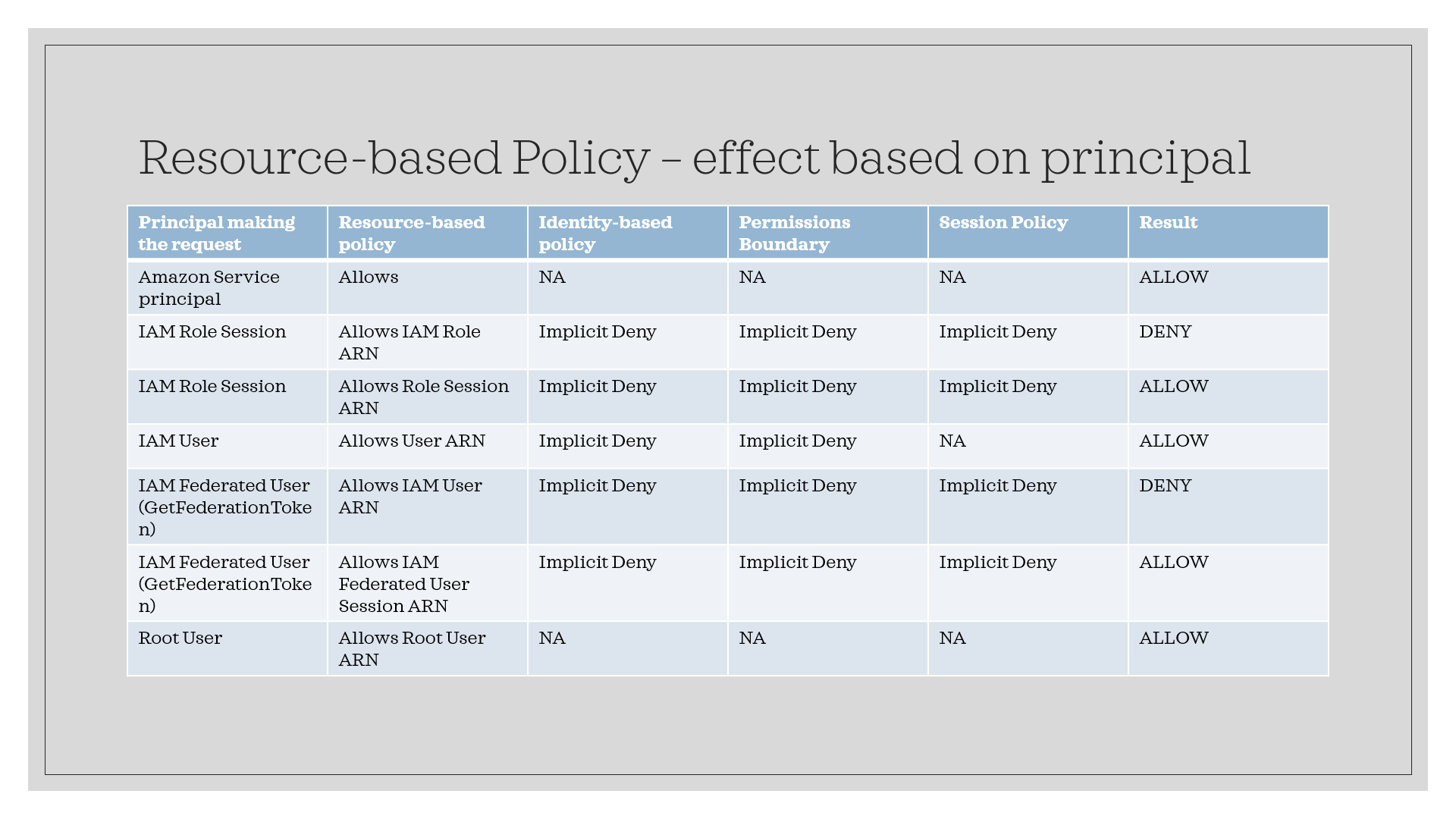
Effect of resource based policies, identity policies and permissions boundary:
- Resource-based policies that specify the user or role as the principal are not limited by the permissions boundary.
Resource-based policies for IAM users:
Within the same account, resource-based policies that grant permissions to an IAM user ARN (that is not a federated user session) are not limited by an implicit deny in an identity-based policy or permissions boundary.
Resource-based policies for IAM Roles:
Resource-based policies that grant permissions to an IAM role ARN are limited by an implicit deny in a permissions boundary or session policy Within the same account, resource-based policies that grant permissions to an IAM role session ARN grant permissions directly to the assumed role session. Permissions granted directly to a session are not limited by an implicit deny in an identity-based policy, a permissions boundary, or session policy.
Resource-based policies for IAM federated user sessions
Resource-based policies that grant Permissions directly to a session are not limited by an implicit deny in an identity-based policy, a permissions boundary, or session policy. However, if a resource-based policy grants permission to the ARN of the IAM user who federated, then requests made by the federated user during the session are limited by an implicit deny in a permission boundary or session policy.
- Depending on the type of principal, an Allow in a resource-based policy can result in a final decision of Allow , even if an implicit deny in an identity-based policy, permissions boundary, or session policy is present.
- This is different than the way that other policies impact policy evaluation.
- For example, policy evaluation differs when the principal specified in the resource-based policy is that of an IAM user, an IAM role, or a session principal.
- Session principals include IAM role sessions or an IAM federated user session.
- If a resource-based policy grants permission directly to the IAM user or the session principal that is making the request, then an implicit deny in an identity-based policy, a permissions boundary, or a session policy does not impact the final decision.
Scenarios:
Third-party access to aws services:
Question:
Scenario: For example, let's say that you decide to hire a third-party company called Example Corp to monitor your AWS account and help optimize costs. In order to track your daily spending, Example Corp needs to access your AWS resources. Example Corp also monitors many other AWS accounts for other customers. How will you provide access to Example Corp?
Answer:
Do not give Example Corp access to an IAM user and its long-term credentials in your AWS account. Instead, use an IAM role and its temporary security credentials. An IAM role provides a mechanism to allow a third party to access your AWS resources without needing to share long-term credentials (for example, an IAM user's access key). Include External ID in the Trust Policy
{
  "Principal": {"AWS": "Example Corp's AWS Account ID"},
  "Condition": {"StringEquals": {"sts:ExternalId": "Unique ID Assigned by Example Corp"}}
}
Customer Managed vs Inline
- Customer managed policies are reusable identity-based policies that can be attached to multiple identities.
- Customer managed policies are useful when you have multiple principals with identical access requirements.
- Inline policies are identity-based policies that are attached to a single principal.
- Use AWS managed policies as a starting point, but better move to customer managed policies.
Best Practices
- Use least privilege for maximum security.
- Access Advisor: See permissions granted and when last accessed.
- Access Analyzer: Analyze resources that are shared with external entity.
- Use SCP and Permission Boundaries to control access. They DO NOT provice access, but rather control.
Mandate MFA for Cross-account assume role
{
  "Version": "2012-10-17",
  "Statement": {
    "Effect": "Allow",
    "Principal": {"AWS": "ACCOUNT-B-ID"},
    "Action": "sts:AssumeRole",
    "Condition": {"Bool": {"aws:MultiFactorAuthPresent": "true"}}
  }
}